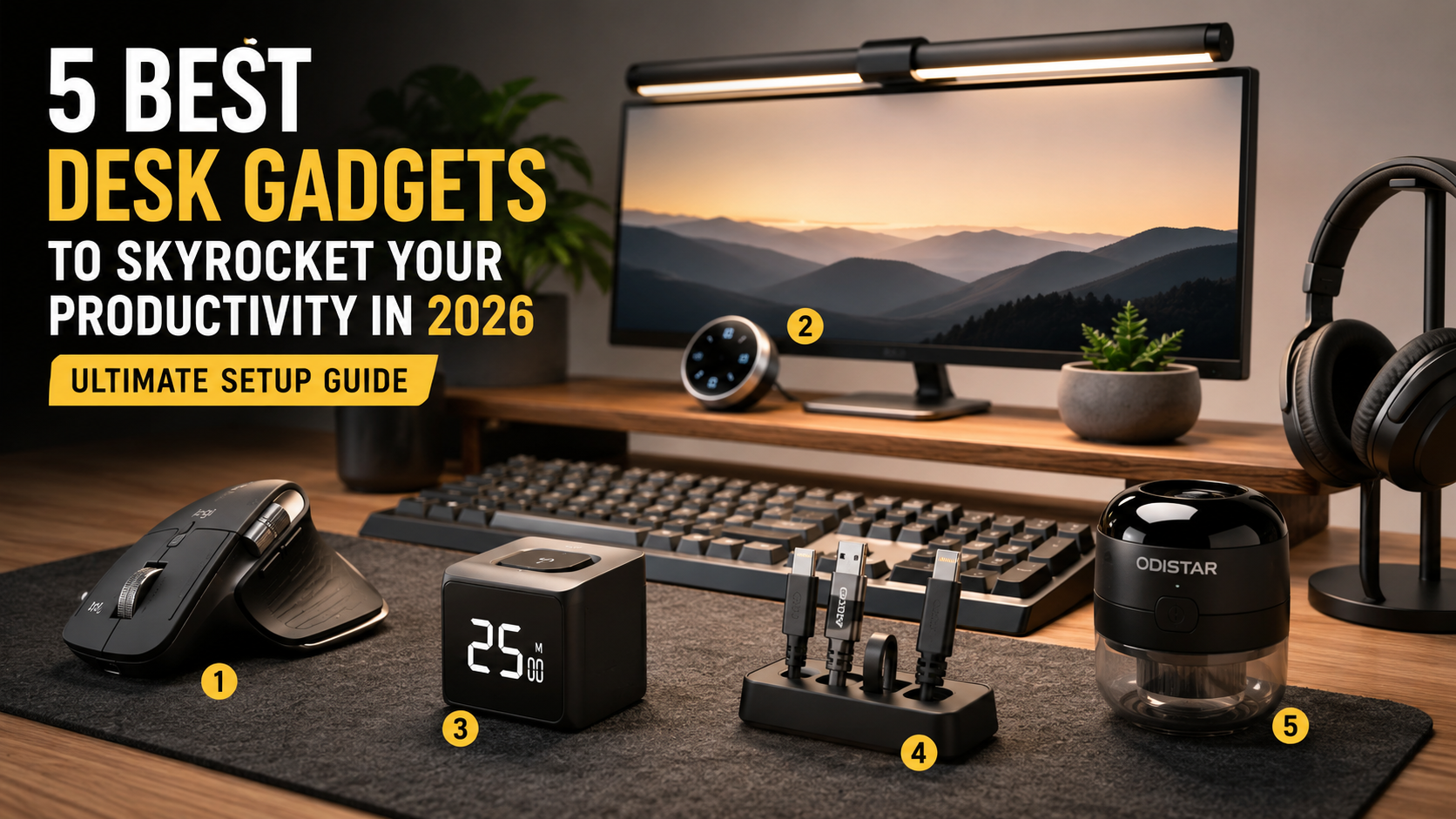
A productive workspace is more than just an attractive desk. The tools you use every day directly influence your focus, comfort, and long-term productivity.
Whether you are a content creator, software developer, designer, student, or remote worker, investing in the right desk accessories can reduce fatigue, improve posture, and help you accomplish more in less time.
In this guide, we explore five of the best productivity desk gadgets available in 2026. Instead of simply listing specifications, you’ll learn who each product is designed for, its strengths and weaknesses, and how it can improve your daily workflow.
What You’ll Learn
- The best productivity desk gadgets for 2026
- Which gadget fits your workflow
- The advantages and disadvantages of each product
- Buying tips before making a purchase
- How to build a cleaner and more productive workspace
1. Logitech MX Master 3S
The Logitech MX Master 3S is widely regarded as one of the best productivity mice available today. Designed for professionals, it combines exceptional comfort, quiet clicks, precision tracking, and powerful software customization to improve everyday workflow.
If your work involves video editing, programming, graphic design, spreadsheets, or content creation, this mouse can significantly reduce repetitive movements while making navigation faster and more efficient.
Key Features
- 8,000 DPI Darkfield sensor
- MagSpeed electromagnetic scroll wheel
- Quiet Click technology
- USB-C rechargeable battery
- Multi-device connectivity
- Logi Options+ software support
Pros
- Excellent comfort during long work sessions
- Very smooth scrolling performance
- Customizable buttons for productivity
- Easy switching between multiple devices
- Premium build quality
Cons
- Higher price than standard office mice
- Designed mainly for right-handed users
- May feel large for users with smaller hands
Who Should Buy It?
This mouse is an excellent choice for video editors, software developers, designers, office professionals, and anyone who spends long hours working on a computer. The combination of ergonomic comfort and customizable shortcuts makes it a worthwhile long-term investment.
Buying Tip
For the best experience, install Logi Options+ software after purchase. It unlocks application-specific shortcuts that can noticeably speed up your workflow in programs like Adobe Premiere Pro, Photoshop, Excel, and Visual Studio Code.
2. BenQ ScreenBar Halo
The BenQ ScreenBar Halo is one of the most popular monitor light bars for professionals who spend long hours in front of a display. Its asymmetric lighting design illuminates your desk without creating glare on the monitor, helping reduce eye strain during extended work sessions.
Unlike traditional desk lamps, the ScreenBar Halo saves desk space while automatically adjusting brightness to match your working environment. It is an excellent upgrade for creators, programmers, designers, and anyone working late at night.
Key Features
- Asymmetric optical lighting
- Wireless desktop controller
- Automatic brightness adjustment
- Rear bias lighting
- Space-saving monitor mount
Pros
- Reduces eye fatigue during long work sessions
- No screen glare
- Creates a cleaner workspace
- Simple and intuitive controls
Cons
- Premium price
- May require an adapter for some curved monitors
Who Should Buy It?
If you spend several hours every day looking at a monitor, this light bar is one of the most effective upgrades for improving visual comfort. It is especially useful for remote workers, designers, programmers, and video editors.
Buying Tip
Check your monitor thickness and compatibility before purchasing. Most standard monitors work perfectly, but certain ultra-wide curved displays may require an additional accessory.
3. TickTime Cube
The TickTime Cube is a smart productivity timer designed for people who want to stay focused without constantly checking their smartphones. Simply flip the cube to start a countdown and begin your next work session.
Key Features
- Gravity flip timer
- E-paper display
- Silent and vibration modes
- Pomodoro timer support
- USB-C rechargeable battery
Pros
- Improves focus without distractions
- Easy one-touch operation
- Portable and lightweight
4. Anker Magnetic Cable Holder
Cable management is one of the easiest ways to create a cleaner workspace. The Anker Magnetic Cable Holder keeps charging cables organized and prevents them from falling behind your desk.
Key Features
- Strong magnetic cable clips
- Reusable adhesive base
- Compatible with USB-C, Lightning and other cables
- Compact design
5. ODISTAR Desktop Vacuum Cleaner
The ODISTAR Desktop Vacuum Cleaner is perfect for keeping keyboards, desks and small workspaces clean. It easily removes dust, crumbs and small debris while taking up very little desk space.
Key Features
- 360° suction design
- USB-C rechargeable
- Compact size
- Built-in cleaning brush
Comparison Table
| Product | Best For | Price |
|---|---|---|
| Logitech MX Master 3S | Professional Productivity | $$$ |
| BenQ ScreenBar Halo | Eye Comfort | $$$ |
| TickTime Cube | Focus | $$ |
| Anker Cable Holder | Cable Management | $ |
| ODISTAR Vacuum | Desk Cleaning | $ |
Frequently Asked Questions
Which gadget offers the biggest productivity improvement?
For most professionals, the Logitech MX Master 3S delivers the biggest improvement because it reduces repetitive work and increases workflow efficiency.
Are these gadgets suitable for remote work?
Yes. Every product in this guide is suitable for home offices, remote work, content creation and professional desk setups.
Final Verdict
Building a productive workspace doesn’t require replacing your entire desk setup overnight. Start with the product that solves your biggest daily frustration, whether that’s wrist fatigue, eye strain, cable clutter, poor focus or desk cleanliness. Small upgrades often create significant long-term improvements in productivity and comfort.
4. Anker Magnetic Cable Holder
A clean workspace starts with proper cable management. The Anker Magnetic Cable Holder keeps charging cables organized and within easy reach, preventing them from slipping behind your desk.
Key Features
- Strong magnetic cable clips
- Reusable adhesive base
- Compatible with USB-C, Lightning and Micro USB cables
- Compact and minimalist design
Pros
- Keeps cables organized
- Easy to install
- Reusable adhesive base
- Affordable price
Cons
- Not suitable for very thick cables
- Requires a clean surface for best adhesion
Best For
Perfect for anyone using multiple charging cables, laptops, tablets, smartphones, or external accessories on the same desk.
Buying Tip
Clean the desk surface before attaching the holder to ensure maximum adhesive strength and long-term durability.
5. ODISTAR Mini Desktop Vacuum Cleaner
The ODISTAR Mini Desktop Vacuum Cleaner is a simple but practical gadget that helps keep your workspace clean. It quickly removes dust, keyboard debris, cookie crumbs, and other small particles without taking up much space.
If you work at your desk every day, keeping your keyboard and mouse area clean can improve comfort while extending the life of your equipment.
Key Features
- 360° suction system
- USB-C rechargeable battery
- Built-in nylon cleaning brush
- Compact and lightweight design
- Easy-to-empty dust container
Pros
- Quickly removes keyboard dust and crumbs
- Portable and easy to store
- Simple one-button operation
- Rechargeable with USB-C
Cons
- Not designed for large debris
- Dust container requires frequent emptying
Best For
Ideal for office workers, students, gamers, mechanical keyboard users, and anyone who wants to maintain a clean and organized desk.
Buying Tip
This vacuum works best for dust, hair, and small food crumbs. It is intended for daily desk maintenance rather than heavy-duty cleaning.
Product Comparison
| Product | Best For | Price Range | Overall Rating |
|---|---|---|---|
| Logitech MX Master 3S | Professional Productivity | $$$$ | ★★★★★ |
| BenQ ScreenBar Halo | Eye Comfort | $$$$ | ★★★★★ |
| TickTime Cube | Focus & Pomodoro | $$ | ★★★★☆ |
| Anker Magnetic Cable Holder | Cable Management | $ | ★★★★☆ |
| ODISTAR Desktop Vacuum | Desk Cleaning | $ | ★★★★☆ |
Frequently Asked Questions
Which desk gadget provides the biggest productivity improvement?
The Logitech MX Master 3S delivers the greatest productivity improvement for most professionals because it combines ergonomic comfort with customizable shortcuts that reduce repetitive work.
Is the BenQ ScreenBar Halo worth the price?
If you spend many hours working in front of a monitor, the ScreenBar Halo can significantly reduce eye strain and improve desk lighting without taking up valuable desk space.
Do I really need a physical timer like TickTime Cube?
Many users find that a dedicated timer helps them stay focused because it removes the temptation to check notifications on their smartphones during work sessions.
Are these products suitable for remote workers?
Yes. Every product in this guide is suitable for home offices, remote work, content creation, programming, design, and general productivity.
Which gadget should I buy first?
If your budget allows only one purchase, start with the product that solves your biggest daily frustration. For most people, that will be either an ergonomic mouse or better desk lighting.
Final Thoughts
A productive workspace is built through small improvements rather than expensive upgrades all at once. Choosing the right desk gadgets can reduce fatigue, improve concentration, and make everyday work more enjoyable. Whether you’re building a professional home office or upgrading your current setup, these five products offer excellent value for improving productivity and comfort.
Related Articles
- Best AI Tools That Will Save You Time in 2026
- Best AI Agents That Will Change the Way You Work in 2026
- The Ultimate Guide to AI Workflow Automation
Disclosure: This article contains affiliate links. As a Coupang Partners participant, we may earn a commission when qualifying purchases are made at no additional cost to you.