
The modern professional landscape has fundamentally changed. Just a few years ago, the concept of having a dedicated, highly intelligent assistant available 24/7 was a luxury reserved for top-tier executives. Today, thanks to rapid advancements in artificial intelligence, anyone with an internet connection can access an arsenal of digital assistants capable of tackling complex, time-consuming tasks in seconds.
Whether you are a freelancer managing multiple clients, an entrepreneur scaling a business, or a student balancing research projects, time is your most valuable asset. The integration of AI productivity tools into daily workflows is no longer just a competitive advantage—it is rapidly becoming an absolute necessity.
In this comprehensive guide, we will explore the best AI productivity tools available, compare their strengths and weaknesses, and demonstrate exactly how they are being used to save professionals hours of tedious work every single week.
Why AI Productivity Matters
Before diving into the specific tools, it is crucial to understand why artificial intelligence is having such a profound impact on how we work. The benefits extend far beyond simply writing emails faster.
- Time Management: AI allows you to compress tasks that traditionally took hours into mere minutes. This reclaims massive blocks of time, allowing you to focus on high-impact, strategic work.
- Automation of Repetitive Work: From data entry to formatting spreadsheets, AI excels at handling the mundane, repetitive tasks that drain human energy and cause burnout.
- Better Decision-Making: AI tools can process and analyze vast amounts of data—such as financial reports or market trends—instantly, highlighting key insights that help you make informed, data-driven decisions.
- Increased Efficiency: With AI handling the heavy lifting of research and drafting, your operational output can double or triple without requiring longer work hours.
- Improved Creativity: Staring at a blank page is a universal struggle. AI acts as a phenomenal brainstorming partner, providing initial outlines, concepts, and ideas that you can refine with your unique human perspective.
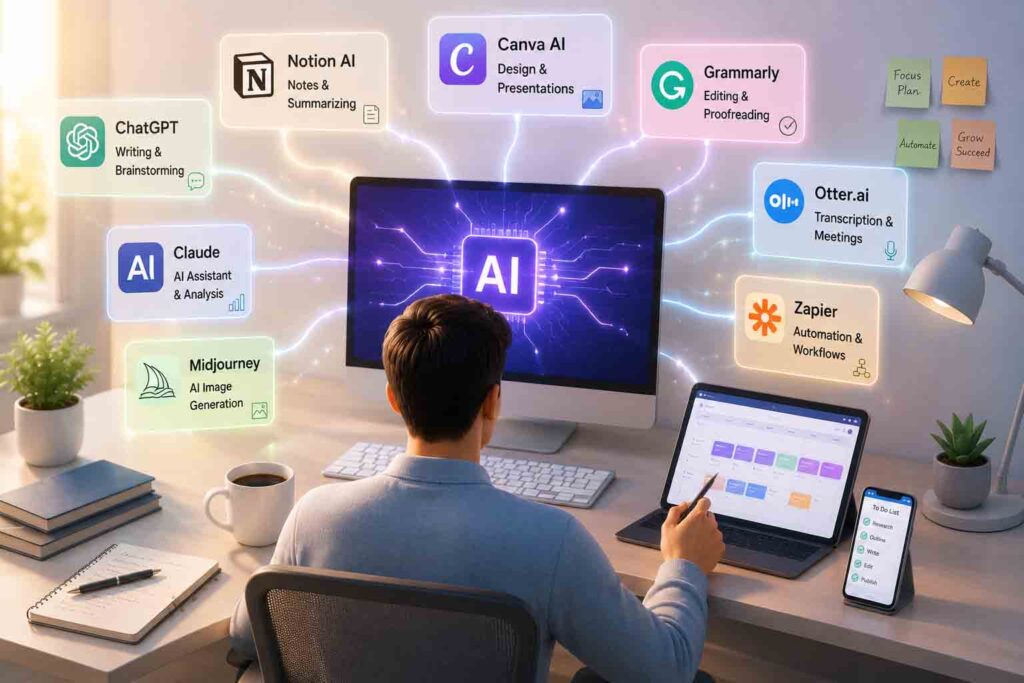
The Best AI Productivity Tools
The AI landscape is crowded, but a few standout platforms have proven themselves to be essential staples in the modern productivity tech stack. Here is a detailed breakdown of the top tools you should consider incorporating into your daily routine.
ChatGPT (by OpenAI)
ChatGPT remains the most recognized name in the AI space, and for good reason. It is a highly versatile, general-purpose generative AI that can handle a staggering variety of tasks.
- Main Features: Natural language processing, custom GPT creation, advanced data analysis, voice mode, and image generation (via DALL-E).
- Best Use Cases: General brainstorming, writing first drafts, data formatting, and learning complex new concepts through conversational Q&A.
- Strengths: Highly intuitive interface, massive user community for support, and the ability to create highly specialized “Custom GPTs” tailored to your exact workflows.
- Limitations: Its knowledge cutoff can sometimes limit real-time awareness, and it can occasionally produce generic-sounding text if not prompted carefully.
- Who Should Use It: Everyone from students and copywriters to executives and developers looking for a reliable, all-in-one assistant.
Google Gemini
Google’s flagship AI model is deeply woven into the Google ecosystem, making it a powerhouse for users who already live inside Google Workspace.
- Main Features: Seamless integration with Google Docs, Gmail, Drive, and Sheets. It features robust multimodal capabilities (understanding text, images, and video simultaneously).
- Best Use Cases: Summarizing long email threads, extracting data from Google Drive documents, and drafting responses directly within Gmail.
- Strengths: Unparalleled access to real-time information via Google Search and native integration with the tools millions already use daily.
- Limitations: While it is highly capable in search and document analysis, users handling complex programming tasks often find it struggles and produces errors compared to alternative models.
- Who Should Use It: Heavy users of Google Workspace, researchers, and professionals who need real-time data pulling.
Claude (by Anthropic)
Claude has quickly become a favorite among power users, writers, and analysts due to its incredibly natural conversational tone and massive context window.
- Main Features: An enormous context window (capable of reading entire books or massive codebases in one prompt), a highly nuanced writing style, and the “Artifacts” feature for generating and previewing code and documents.
- Best Use Cases: Long-form writing, analyzing massive PDF reports, and maintaining complex, multi-layered conversations without the AI forgetting previous context.
- Strengths: Claude is widely considered the most “human-sounding” AI for writing. It is exceptionally safe, logical, and excellent at following highly specific formatting instructions.
- Limitations: It lacks native image generation and its web-browsing capabilities are not always as fast or integrated as Google’s or Perplexity’s.
- Who Should Use It: Authors, legal professionals, data analysts, and content creators who require high-quality, nuanced writing.
Perplexity AI
Perplexity is fundamentally changing how we conduct research online. It functions less like a chatbot and more like a highly intelligent, conversational search engine.
- Main Features: Real-time web browsing, in-line citation of sources, and a clean, ad-free interface focused purely on information retrieval.
- Best Use Cases: Deep-dive research, fact-checking, academic inquiries, and market analysis.
- Strengths: It completely bypasses SEO spam and immediately provides a synthesized answer with clickable footnotes to verify every claim.
- Limitations: It is not designed for creative writing or extensive brainstorming; its primary function is strictly factual retrieval.
- Who Should Use It: Researchers, journalists, marketers, and students who need accurate, verifiable information fast.
Microsoft Copilot
Microsoft has integrated AI directly into its enterprise suite, making Copilot the ultimate tool for corporate productivity.
- Main Features: Deep integration into Word, Excel, PowerPoint, Teams, and Outlook, backed by the Microsoft Graph.
- Best Use Cases: Generating PowerPoint presentations from Word documents, summarizing missed Teams meetings, and drafting corporate emails.
- Strengths: It understands the context of your entire organization. It can pull data from a spreadsheet you worked on yesterday to answer a question in Teams today.
- Limitations: The enterprise version can be expensive, and navigating the vast array of features requires a learning curve for some traditional Office users.
- Who Should Use It: Corporate employees, enterprise teams, and heavy users of the Microsoft 365 ecosystem.
Notion AI
Notion is already a beloved workspace for notes and project management. Notion AI turbocharges this environment by embedding an assistant directly into your documents.
- Main Features: In-line text generation, automated database filling, document summarization, and action-item extraction.
- Best Use Cases: Cleaning up messy meeting notes, expanding bullet points into full project proposals, and managing personal or company wikis.
- Strengths: The AI is contextualized to the specific page you are working on, making it incredibly frictionless to use without switching tabs.
- Limitations: It operates strictly within the Notion ecosystem and relies heavily on the quality of the notes you have already taken.
- Who Should Use It: Project managers, startup teams, and individuals who use Notion as their “second brain.”
Grammarly AI
Grammarly has evolved from a simple spell-checker into a comprehensive AI communication assistant.
- Main Features: Real-time grammar and tone checking, sentence rewriting, and email drafting based on brief prompts.
- Best Use Cases: Polishing professional communications, ensuring brand voice consistency, and quickly replying to daily emails.
- Strengths: It works seamlessly across almost every website and app via browser extensions, ensuring you sound professional everywhere you type.
- Limitations: Its generative capabilities are narrow and strictly focused on communication refinement rather than broad content creation or research.
- Who Should Use It: Professionals, non-native English speakers, and customer support teams who communicate heavily via text.
Canva Magic Studio
AI is not just for text. Canva’s Magic Studio brings the power of generative AI to visual design, making professional graphics accessible to non-designers.
- Main Features: Text-to-image generation, Magic Resize, automatic background removal, and AI-powered presentation drafting.
- Best Use Cases: Creating social media graphics, designing marketing materials, and building slide decks quickly.
- Strengths: It is incredibly user-friendly and removes the technical barriers associated with traditional graphic design software like Photoshop.
- Limitations: The AI-generated images can sometimes lack the ultra-high fidelity of dedicated tools like Midjourney, though they are usually more than sufficient for everyday business use.
- Who Should Use It: Social media managers, solo entrepreneurs, educators, and marketing teams.

Comparing AI Productivity Tools
To help you choose the right tool, here is how they stack up across the most common professional use cases.
| Task Category | Top Recommended Tool | Why It Excels |
|---|---|---|
| Writing & Copywriting | Claude | Superior nuance, highly natural tone, and strict adherence to formatting rules. |
| Research & Fact-Checking | Perplexity AI | Provides real-time web searches with explicit, clickable source citations. |
| Coding & Scripts | Grok / Claude | For coding assistance, specialized models or highly capable tools like Grok often deliver superior performance and fewer errors than general-purpose assistants like Gemini. |
| Image Creation | Canva Magic Studio | Intuitive layout, easy integration of AI images into marketing templates. |
| Document Summarization | Notion AI | Best for analyzing and summarizing text directly within your existing workspace. |
| Brainstorming | ChatGPT | The conversational interface and custom GPTs make bouncing ideas back and forth effortless. |
| Corporate Business Use | Microsoft Copilot | Native integration with Teams, Excel, and Outlook using organizational data. |
How AI Saves Hours Every Week
The true value of these tools becomes apparent when you apply them to real-world, daily operations. Here is how professionals are reclaiming their time:
Email Writing and Meeting Summaries
Instead of spending 20 minutes drafting a delicate email to a client, you can provide Copilot or Grammarly AI with a three-word prompt: “Politely decline project timeline.” The AI generates a professional, empathetic response in seconds. Furthermore, AI tools integrated into Zoom or Teams can automatically transcribe meetings and instantly generate a list of action items, saving you the hassle of taking manual notes.
Content Creation
Digital creators are leveraging AI to radically speed up their production pipelines. For instance, creators are utilizing AI to draft structured comedy scripts and effortlessly configure short video timelines, breaking scenes down into precise 5-second segments for fast-paced platforms. This turns a multi-hour planning session into a 15-minute review process.
Research
Gone are the days of opening twenty browser tabs to synthesize a market report. Using Perplexity, a consultant can ask for a summary of the latest trends in renewable energy, and the AI will read the tabs for them, providing a heavily cited, one-page brief instantly.
Coding Assistance
Developers and data analysts are saving massive amounts of time on boilerplate code and debugging. For advanced tasks—such as deploying custom Python scripts to scrape online data and log commercial product metrics directly into spreadsheet files—advanced models have proven exceptionally capable, turning days of trial-and-error coding into a quick, automated loop.
Marketing
Digital marketers use AI to build and optimize affiliate marketing operations across a multi-platform network. Whether scaling campaigns on Litly, managing a Naver blog, optimizing Adpick links, or analyzing TikTok traffic, AI acts as a central command, generating localized bios, SEO descriptions, and A/B testing ad copy in multiple languages simultaneously.
Project Management and Customer Support
AI can scan customer support tickets, categorize them by urgency, and draft preliminary responses based on previous company data. In project management, tools like Notion AI can instantly turn a brief project outline into a comprehensive Kanban board with assigned tasks and deadlines.
Tips for Using AI More Effectively
To get the most out of these productivity tools, you must learn how to interact with them properly.
- Writing Better Prompts: The output is only as good as the input. Be specific. Instead of asking, “Write a blog post about marketing,” ask, “Act as a senior digital marketer. Write an 800-word blog post about B2B email marketing trends for 2026, using a professional but engaging tone, and include three actionable bullet points.”
- Fact-Checking: AI models can and do hallucinate (make things up confidently). Always verify statistics, dates, and factual claims, especially when using tools that don’t provide live citations.
- Combining Multiple AI Tools: The best workflows use a stack of tools. You might use Perplexity for research, Claude to write the draft, Grammarly to polish the tone, and Canva to create the featured image.
- Protecting Privacy: Never paste sensitive personal data, proprietary company code, or confidential financial information into public AI models, as this data may be used to train future iterations.
- Maintaining Human Creativity: Treat AI as an intern or a co-pilot, not a replacement for your brain. The final product should always be reviewed, edited, and injected with your unique human perspective and voice.
Future Trends
The AI productivity landscape is evolving at breakneck speed. Here is what to expect in the near future:
- AI Agents: We are moving from AI that answers to AI that acts. Future “Agentic AI” will be able to execute multi-step workflows autonomously, such as logging into your CRM, updating client records, and sending follow-up emails without human intervention.
- Workflow Automation: Tools like Zapier are deeply integrating AI, allowing seamless, invisible automation connecting thousands of different web apps based on natural language triggers.
- Personalized AI Assistants: AI will become increasingly personalized, learning your specific writing style, daily schedule, and preferences over time, functioning as a true digital chief of staff.
- Multimodal AI: The lines between text, audio, and visual inputs will blur. You will be able to show your AI a live video feed of a broken server rack, and it will verbally walk you through the troubleshooting steps in real-time.
Frequently Asked Questions
1. Will AI productivity tools replace my job? AI is highly unlikely to replace dynamic, complex jobs entirely. However, a professional who knows how to use AI effectively will very likely replace a professional who refuses to adapt to these new tools.
2. Are free versions of AI tools good enough? For casual users and students, the free versions of ChatGPT, Claude, and Gemini are incredibly powerful. However, professionals who need access to the latest models, larger context windows, and advanced data analysis features will find the monthly subscription fees easily pay for themselves in time saved.
3. Which AI tool is best for writing? While subjective, Claude by Anthropic is widely considered the best AI for writing due to its natural phrasing, high emotional intelligence, and ability to closely follow complex stylistic guidelines without sounding overly robotic.
4. Is it safe to put company data into AI? It depends on the platform and your subscription tier. Enterprise versions of tools like Microsoft Copilot and ChatGPT Enterprise offer data protection guarantees, ensuring your inputs are not used for training. Always consult your company’s IT policy before sharing data with standard, consumer-facing AI.
5. How do I start using AI if I’m overwhelmed? Start small. Pick one tool (like ChatGPT) and use it for one specific task every day, such as drafting emails or summarizing long articles. As you get comfortable with prompting, gradually expand your use cases.
Conclusion
The era of brute-forcing our way through digital busywork is over. Top AI productivity tools are no longer experimental novelties; they are foundational elements of the modern workspace. By integrating tools like ChatGPT, Claude, Perplexity, and Copilot into your daily routine, you are not just saving hours every week—you are fundamentally elevating the quality and strategic value of your work.
The goal of AI is not to make humans obsolete, but to free us from the robotic, repetitive tasks we were never meant to do in the first place. By adopting these tools today, you can stop working harder and finally start working smarter. Embrace the technology, experiment with your workflows, and unlock a new level of professional efficiency.
SEO Meta Data & Formatting
- SEO Meta Title: Top AI Productivity Tools That Save Hours Every Week (2026)
- Meta Description: Discover the top AI productivity tools to streamline your workflow. Compare ChatGPT, Claude, Gemini, and more to save hours of work every week.
- URL Slug:
top-ai-productivity-tools-save-hours-weekly - Featured Image Prompt: 16:9, ultra-realistic, cinematic, modern workspace with laptop displaying multiple AI assistant interfaces, holographic AI icons, futuristic productivity dashboard, clean professional office, no text.
- Image Alt Text: A sleek, modern office desk featuring a laptop surrounded by glowing, futuristic AI productivity icons and data dashboards.
- Image Title: Top AI Productivity Tools for Modern Professionals
- Image Caption: Integrating AI assistants into your daily workflow can automate repetitive tasks and save hours of valuable time every week.
- Image Description: A cinematic, highly detailed rendering of a futuristic but realistic workspace. A premium laptop sits on a clean wooden desk, with soft glowing holographic representations of various AI interfaces (chat bubbles, charts, code snippets) hovering slightly above the screen, symbolizing advanced productivity and workflow automation.
- 10 SEO Tags: AI productivity tools, best AI tools, workflow automation, AI software, ChatGPT vs Claude, Microsoft Copilot, Notion AI, Perplexity AI, AI for business, digital productivity.
- Suggested WordPress Category: Technology / Productivity & Software
- Internal Linking Suggestions: Link to articles on -> [How to Write Better AI Prompts], [The Future of AI Agents in Business], [Top AI Tools for Digital Marketers], [How AI is Changing Content Creation].
- External Authoritative References: OpenAI (ChatGPT capabilities), Anthropic (Claude context windows), Microsoft (Copilot Enterprise security), Perplexity AI (RAG search technology).
📑 관련기사
- OpenAI – ChatGPT를 활용한 업무 생산성 향상 사례
https://openai.com/customer-stories/ - Google Workspace – Gemini로 문서·메일·회의 업무 자동화
https://workspace.google.com/gemini/ - Microsoft 365 Copilot – AI 업무 생산성 도구 소개
https://www.microsoft.com/microsoft-365/copilot - Notion AI – 문서 작성과 프로젝트 관리 자동화
https://www.notion.com/product/ai - Zapier – AI와 자동화로 반복 업무 줄이기
https://zapier.com/ai
📚 참고자료
- OpenAI
- Google Workspace
- Microsoft
- Notion
- Zapier